
Guide / Install Algoryvo
Install and activate Algoryvo
Copy the file, activate your licence and verify everything works. Five minutes if you follow the steps in order — the allowed-URLs step is the one nobody should skip.
1. Install the EA
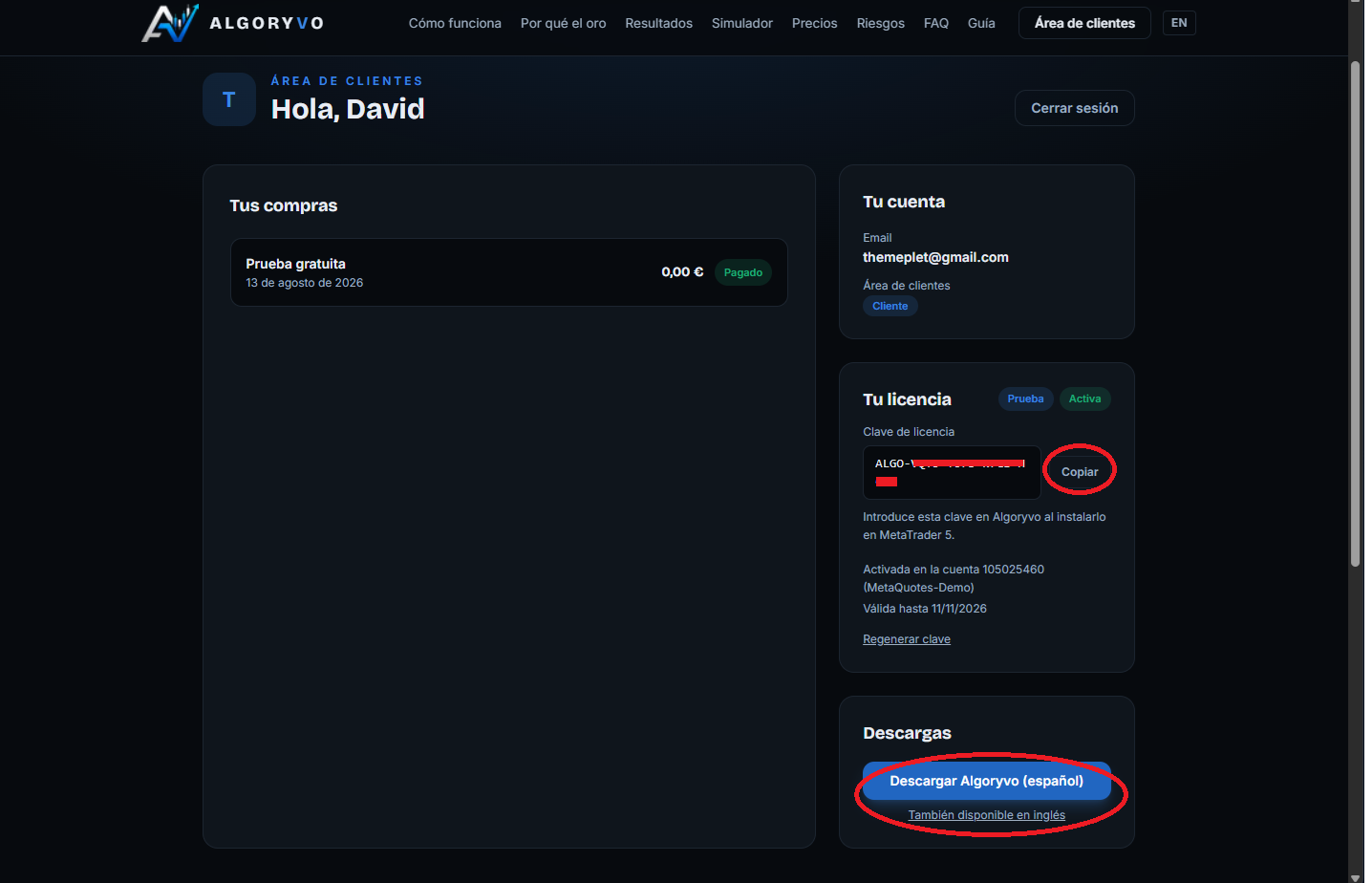
Go to your client area and download the .ex5 file in your language from the Downloads card. Your licence key is right there too: copy it, you will need it in step 4.
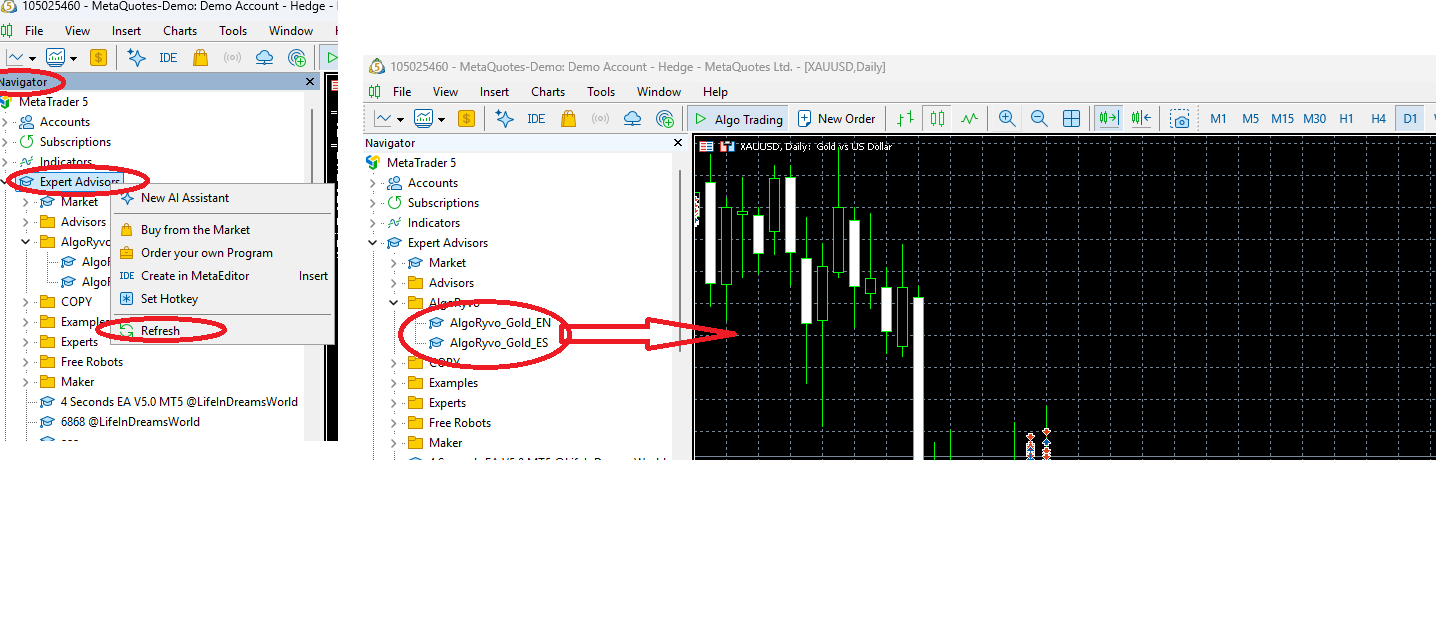
In MetaTrader 5: File → Open Data Folder → MQL5 → Experts. Paste the .ex5 file there. Then, in the MT5 Navigator (Ctrl+N), right click Expert Advisors → Refresh: Algoryvo will appear in the list.
2. Activate the licence
The step nobody should skip
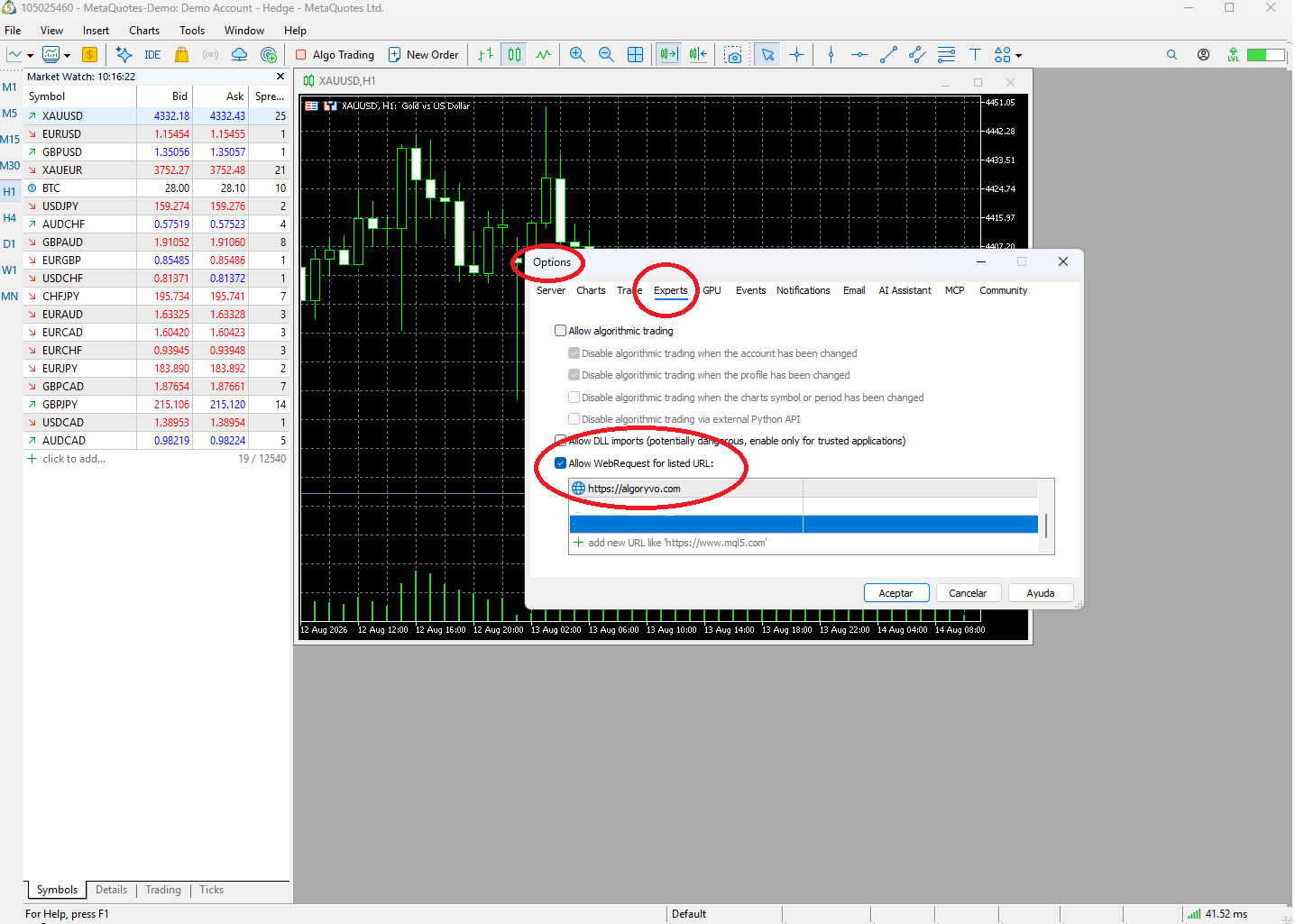
Algoryvo validates your licence against our server. For MT5 to allow it, you must add the URL to the list of authorised addresses — without this, the EA cannot activate.
Tools → Options → Expert Advisors tab → tick “Allow WebRequest for listed URL” and add exactly this address:
https://algoryvo.com
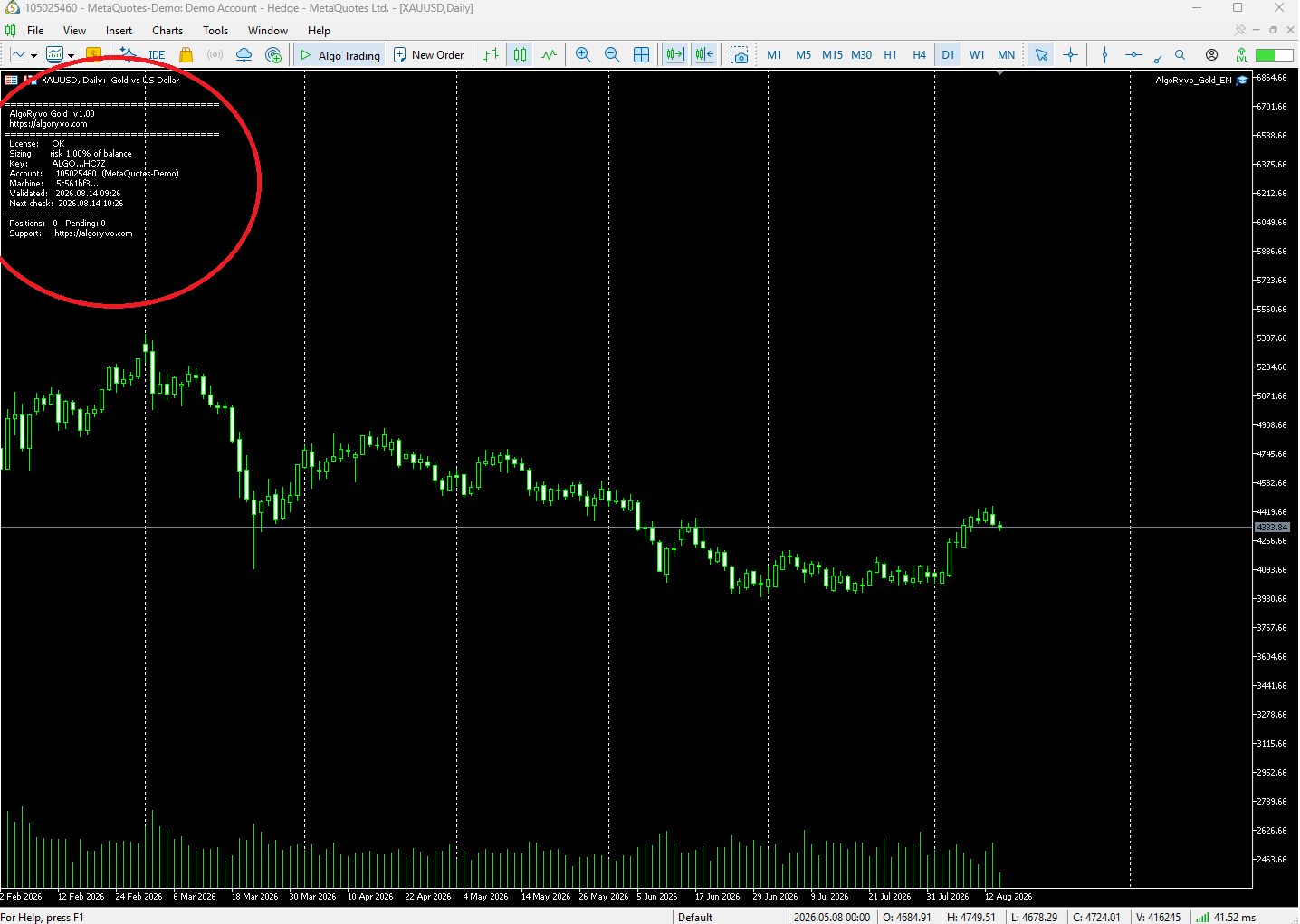
Enable the Algo Trading button in the top bar (green). Open the Navigator with Ctrl+N, right click Expert Advisors → Refresh, find “AlgoRyvo_Gold” and drag it onto the XAUUSD chart. In the window that opens, Common tab, tick “Allow algorithmic trading”, and in Inputs paste your key into the “License key (InpLicKey)” field. Accept.
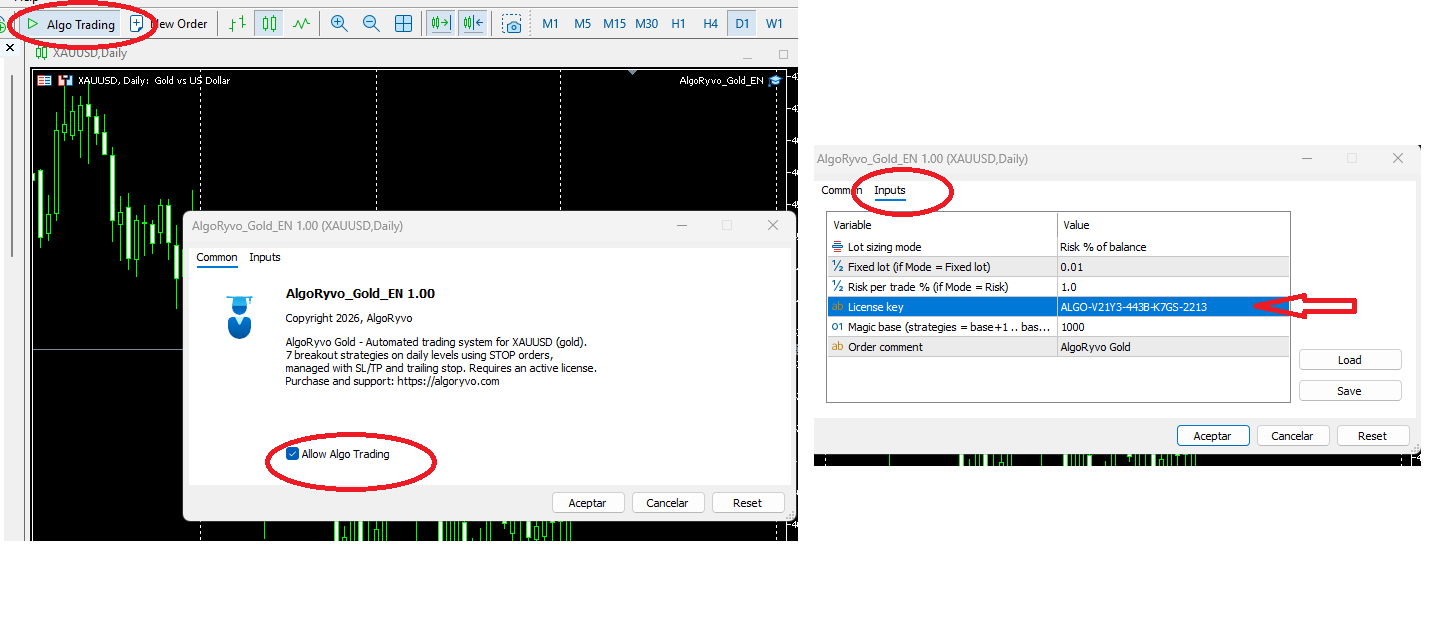
In the chart corner you will see the EA name with a blue hat (active). The Experts tab of the Toolbox will show the licence-validated message. If you see “licence in use” or “invalid”, check the Help section.
3. Understand the settings
These are the EA's input parameters. Important note: the backtested results published on this website are calculated at a fixed 0.01 lot; the mode and values you use are always your decision. Default settings are generic technical defaults, not personalised recommendations.
| Setting | What it does | Who decides? |
|---|---|---|
| Lot sizing mode (InpLotMode) | Chooses how each trade is sized: Fixed lot or Risk % of balance. | User |
| Fixed lot (InpLots) | Size of each trade when the mode is Fixed lot. The published track record uses 0.01. | User |
| Risk per trade % (InpRiskPct) | Percentage of the balance risked on each trade when the mode is Risk. | User |
| License key (InpLicKey) | Activates the software with your licence. Paste it exactly as shown in your client area. | — |
| Magic base (InpMagicBase) | Identifier the EA uses to tag its orders (uses base+1 to base+8). Only change it if another EA in your terminal uses the same range. | User |
| Order comment (InpComment) | Text attached to orders in the broker history. Purely informative. | User |
Technical support ≠ investment advice
Our support explains what a parameter does and how to change it. What we will never do is tell you what capital, lot or leverage to use: that separation is what keeps Algoryvo independent software.
4. Final checklist
- Algo Trading button green and blue hat on the chart
- Experts and Journal tabs free of licence or connection errors
- Demo account with balance visible and prices moving
- Let the EA run on demo for as long as you need before considering anything else
5. Updating to a new version
When we publish a compatibility update we will let you know. The process is identical to installing: download the new .ex5 from your account, replace the file in MQL5/Experts and restart MT5. Your key stays the same.
Nothing changes without you
Updates never install themselves or modify the trading behaviour remotely: you install any new version yourself, when you decide.